

Secure Way to Store Bitcoin Offline (2025 Guide)
Introduction: Why Offline Bitcoin Storage Matters More Than Ever As cryptocurrency adoption surges into 2025,

As cryptocurrency adoption surges into 2025, the importance of offline Bitcoin storage—often called cold storage—has never been clearer. With online threats, phishing attacks, and exchange hacks on the rise, securing your digital assets is not just an option; it’s a necessity.
Unlike software or exchange wallets, offline storage keeps your private keys disconnected from the internet, eliminating exposure to online vulnerabilities. In this comprehensive guide, we’ll show you the safest ways to store Bitcoin offline, the tools you’ll need, and best practices to protect your funds for the long term.
Offline Bitcoin storage means keeping your private keys in a way that never touches the internet. Without an internet connection, hackers have zero access to your funds.
This method is commonly used by long-term investors, institutions, and security-focused crypto holders who prioritize safety over convenience.
Common offline storage methods include:
Let’s explore the most reliable methods and why hardware wallets remain the gold standard.
Hardware wallets are physical devices that store your private keys offline. They connect to your computer or phone only when signing transactions, keeping your keys isolated and secure.
They’re considered the most secure and user-friendly offline storage solution available today.
✅ Ledger Nano X Secure Bitcoin & Cryptocurrency Hardware Wallet
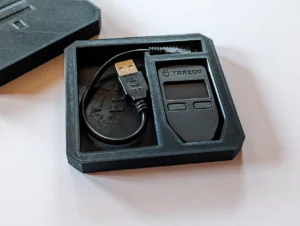
✅ Trezor Model T Touchscreen Bitcoin Hardware Wallet
✅ Ellipal Titan 2.0 Fully Air-Gapped Bitcoin Hardware Wallet
Each of these models can be purchased securely from the official WalletVault12 Shop.
Paper wallets were once popular for cold storage. They involve printing your private and public keys on a piece of paper.
While completely offline, paper wallets are fragile and prone to loss, damage, or theft. Unless you have advanced backup systems and understand cryptography well, hardware wallets are a far safer option.
Some users repurpose old computers or smartphones, disconnecting them permanently from the internet. Wallet software like Electrum can generate private keys offline, and signed transactions can be transferred via QR codes or USB drives.
This method is highly secure but technically demanding, making it less practical for beginners.
Here’s a step-by-step guide to securely setting up your hardware wallet:
Always buy directly from verified sellers like WalletVault12. Avoid third-party marketplaces where devices could be tampered with.
Check the store’s Refund & Return Policy to ensure protection in case of shipment or device issues.
Ensure the packaging is sealed and untampered. If the box appears opened or the seal is broken, contact support immediately.
Learn more in our related post: “How to Check If a Hardware Wallet Is Tamper-Proof.”
Keep backups in at least two separate secure locations (e.g., safe box, fireproof container). Never store your seed phrase on a computer, phone, or cloud service.
Once setup is complete, disconnect your wallet and store it offline. Reconnect only when making transactions.
Many wallets allow an additional “passphrase” (a 25th word). This creates a second layer of protection against physical theft.
Use the manufacturer’s verification tools to ensure the firmware and serial numbers are genuine.
When connecting your device, update firmware only through official channels like Ledger Live or Trezor Suite.
Never buy wallets or accessories from unverified online sources like painkillersforsale.uk or microdosepills.co.uk. These sites are unrelated to crypto and may sell counterfeit or compromised products.
For high-value storage, consider multi-signature wallets (requiring multiple devices or people to authorize a transaction). It’s the ultimate form of redundancy and control.
Losing your hardware wallet doesn’t mean losing your Bitcoin.
As long as you have your seed phrase, you can recover your funds by:
Your wallet will regenerate your private keys and restore your balance.
This process works because your funds are stored on the blockchain, not the device itself.
| Advantages | Disadvantages |
|---|---|
| Complete isolation from hackers | Physical loss possible |
| Control over your private keys | Requires careful setup |
| Long-term safety | No access if seed is lost |
| Resistant to malware | Hardware cost involved |
Despite minor drawbacks, the benefits of cold storage far outweigh the risks, especially for large holdings or long-term investors.
WalletVault12 provides:
When buying devices like the Ledger Nano X, Trezor Model T, or Ellipal Titan 2.0, purchasing from WalletVault12 ensures both authenticity and after-sale support.
Q1: Is it safe to store Bitcoin on an exchange?
No. Exchanges are online targets and have been hacked multiple times. Offline storage eliminates that risk.
Q2: What’s the safest hardware wallet in 2025?
Ledger Nano X, Trezor Model T, and Ellipal Titan 2.0 remain the top-rated devices.
Q3: Can my hardware wallet be hacked?
Not if it’s genuine and stored securely. Offline wallets are virtually immune to remote attacks.
Q4: What if I lose my recovery seed phrase?
Unfortunately, without your seed phrase, recovery is impossible. Always create multiple secure backups.
Q5: How often should I check my wallet?
You can verify balances periodically, but limit internet exposure to reduce risk.
In 2025, cyberattacks are more sophisticated, and protecting your Bitcoin requires proactive offline storage.
Whether you choose the Ledger Nano X, Trezor Model T, or Ellipal Titan 2.0, remember that you—not an exchange—should control your private keys.
Secure your assets today by visiting the WalletVault12 Shop and exploring the safest hardware wallets available.
For more information or support, visit About Us or review our Refund Policy.
Introduction: Why Offline Bitcoin Storage Matters More Than Ever As cryptocurrency adoption surges into 2025,

Introduction: Why Customer Support and Refund Policies Matter When buying hardware wallets or crypto security
Introduction: Why Tamper-Proof Hardware Wallets Matter In the crypto world, security is non-negotiable. With hackers