

Secure Way to Store Bitcoin Offline (2025 Guide)
Introduction: Why Offline Bitcoin Storage Matters More Than Ever As cryptocurrency adoption surges into 2025,

As cryptocurrency adoption grows, wallet security has never been more important. Billions of dollars in digital assets are lost each year due to phishing attacks, exchange hacks, and malware.
The safest solution? Hardware wallets — physical devices that store your private keys offline, away from internet threats.
This guide explains the core security features of crypto hardware wallets, how they protect your funds, and which models (like the Ledger Nano X, Trezor Model T, and ELLIPAL Titan 2.0) are setting new standards for crypto safety.
A hardware wallet is a small, USB-like device that stores your private keys offline.
Unlike hot wallets or exchange accounts, it doesn’t expose your credentials to the internet, making it nearly impossible for hackers to access.
In essence, hardware wallets give you full sovereignty over your digital assets — a principle WalletVault12 champions in their About Us page.
Hardware wallets store your private keys completely offline.
Even if your computer is infected with malware, your keys remain safe — a feature that makes them far more secure than web or mobile wallets.
Many premium models, such as the Ledger Nano X, use Secure Element chips — tamper-resistant microprocessors also used in passports and credit cards.
They prevent physical and side-channel attacks by isolating sensitive information.
Before you can access your funds, you must enter a PIN code directly on the device.
This prevents unauthorized access even if the device is lost or stolen.
For advanced users, adding a BIP39 passphrase (an extra layer of encryption) enhances wallet security further.
Each wallet generates a 12-, 18-, or 24-word recovery phrase.
This seed allows you to recover your crypto if the device is lost or damaged.
Store it offline in a secure place — never share or photograph it.
Authentic hardware wallets include firmware verification to ensure the device hasn’t been tampered with.
Always update firmware from official sources only — like WalletVault12’s linked manufacturers.
The ELLIPAL Titan 2.0 is completely air-gapped — meaning it never connects via USB or Bluetooth.
Transactions are signed using QR codes, offering maximum isolation from online threats.
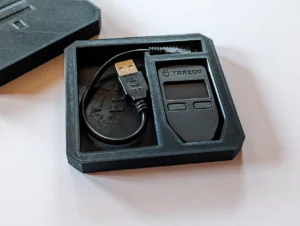
The Trezor Model T is fully open-source, allowing independent verification of its code.
This ensures transparency and allows the community to detect and fix vulnerabilities early.
| Wallet | Secure Element | Air-Gapped | Open Source | Touchscreen | Bluetooth |
|---|---|---|---|---|---|
| Ledger Nano X | ✅ | ❌ | ❌ | ❌ | ✅ |
| Trezor Model T | ❌ | ❌ | ✅ | ✅ | ❌ |
| ELLIPAL Titan 2.0 | ✅ | ✅ | ❌ | ✅ | ❌ |
Each wallet offers unique security advantages — the right choice depends on your needs.
Transactions must be confirmed on-device, preventing fake approval via phishing sites or malware.
Because keys are stored offline and inputs happen on the wallet, keyloggers and screen recorders cannot capture your credentials.
Most hardware wallets, such as the Ledger Nano X, detect physical tampering attempts — erasing sensitive data automatically.
Before setup, wallets verify the integrity of their firmware, ensuring you’re using a genuine device. Always buy from verified retailers like WalletVault12.com.
Follow these best practices for maximum protection:
These steps minimize the risk of compromise and ensure long-term wallet integrity.
To learn more about WalletVault12’s transparency and service policies, check:
For those ready to secure their assets, visit the full catalog here:
👉 Shop All Hardware Wallets
For insights into secure online transactions and consumer protection practices, visit:
These sites demonstrate e-commerce safety and customer data protection principles similar to WalletVault12’s own standards.
Always check packaging, holographic seals, and firmware version before setting up your hardware wallet.
If in doubt, contact the official support channel or refer to WalletVault12’s Refund and Return Policy for verification or replacement assistance.
You can recover your funds using the recovery seed phrase on a new device. Keep your seed secure and offline.
Not directly. As long as your recovery phrase and PIN remain private, your funds are safe — even if your computer is compromised.
Check for updates every few months or when notified by the manufacturer. Always update only from official sources.
Yes. All modern hardware wallets support multi-currency storage, managed via official apps like Ledger Live or Trezor Suite.
Crypto security isn’t optional — it’s essential. Hardware wallets give you peace of mind, combining cutting-edge technology with user-friendly protection.
Whether you prefer the Bluetooth flexibility of Ledger, open-source assurance of Trezor, or air-gapped safety of ELLIPAL, you’re making a smart move toward safeguarding your digital wealth.
✅ Store offline.
✅ Verify authenticity.
✅ Control your keys — always.
Ready to enhance your crypto security?
👉 Explore WalletVault12 Hardware Wallets
Introduction: Why Offline Bitcoin Storage Matters More Than Ever As cryptocurrency adoption surges into 2025,

Introduction: Why Customer Support and Refund Policies Matter When buying hardware wallets or crypto security
Introduction: Why Tamper-Proof Hardware Wallets Matter In the crypto world, security is non-negotiable. With hackers